Introduction
Before writing your first line of C# code, you need a proper .NET development environment. A clean setup saves hours of debugging and frustration later.
In this article, you’ll learn:
How to install .NET 8 SDK
Which IDE to choose (Visual Studio vs VS Code)
How to verify your installation
Create and run your first .NET application
This guide works on Windows, Linux, and macOS.
What You Need Before Starting
Minimum Requirements
8 GB RAM (recommended)
10 GB free disk space
Internet connection
Supported Operating Systems
Windows 10 / 11
Ubuntu 20.04+
macOS Monterey+
Step 1: Install .NET 8 SDK
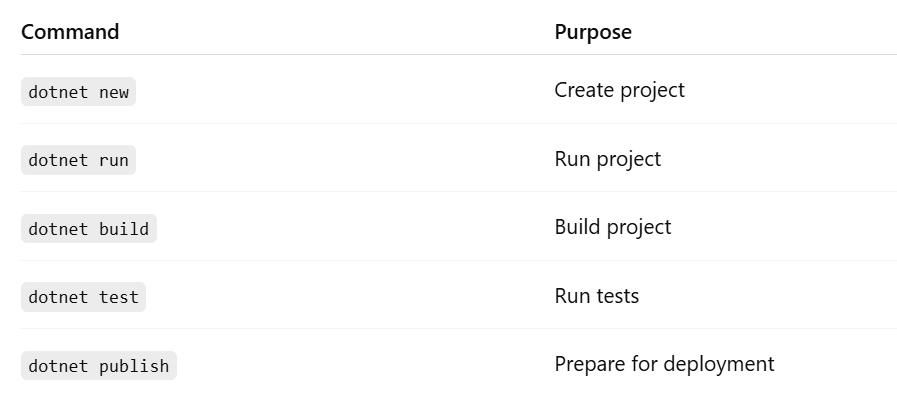
The SDK (Software Development Kit) includes everything needed to:
Build
Run
Test
Publish .NET applications
🔹 Windows
Go to the official .NET website
Download .NET 8 SDK (LTS)
Run installer → Next → Install
✔ Automatically added to PATH
🔹 Linux (Ubuntu)
plaintext
sudo apt update
sudo apt install dotnet-sdk-8.0
Verify:
plaintext
dotnet --version
🔹 macOS
Using Homebrew:
plaintext
brew install --cask dotnet-sdk
Verify:
plaintext
dotnet --version
Step 2: Choose Your Code Editor / IDE
🟦 Option 1: Visual Studio (Recommended for Beginners)
Best for:
Beginners