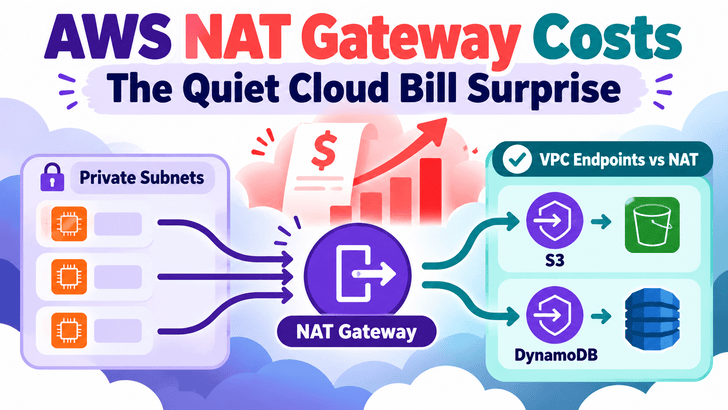
AWS NAT Gateway is one of those services that can run quietly in the background for months without attracting much attention. Your applications work, private subnets can reach external services, deployments succeed, and nobody thinks twice about the networking layer.
Then the AWS bill jumps.
The first instinct is often to investigate EC2, S3, RDS, Kubernetes, or application traffic. But sometimes the unexpected cost is sitting somewhere less obvious:
NAT Gateway data processing.
AWS charges for both the time a NAT Gateway is provisioned and the amount of data it processes. When large volumes of traffic from private subnets pass through it, the per-GB processing component can become significant. AWS Documentation
The important lesson is simple:
NAT Gateway should be used for traffic that genuinely needs NAT—not automatically for every outbound request from a private subnet.
Why NAT Gateway Costs Can Be Easy to Miss
A typical AWS architecture looks something like this:
text
Private Subnet
     |
     v
NAT Gateway
     |
     v
Internet Gateway
     |
     v
Internet
This is a perfectly normal design.
Applications running in private subnets may need to:
download packages
call external APIs
communicate with SaaS platforms
download container images
access third-party services
install operating-system updates
A NAT Gateway gives those workloads outbound connectivity without exposing them directly to inbound internet traffic.
The problem begins when AWS-to-AWS traffic also takes this route unnecessarily.
For example:
text
EC2 / ECS / EKS
      |
      v
Private Subnet
      |
      v
NAT Gateway
      |
      v
Amazon S3
Technically, this can work.
Financially, it may be inefficient.
AWS explicitly recommends considering VPC endpoints when large amounts of NAT Gateway traffic are destined for AWS services that support them. AWS Documentation
Imagine a workload that transfers several terabytes through NAT every month.
Using an illustrative processing price of $0.045 per GB—the price AWS currently shows in one of its architecture examples—the processing portion alone would look roughly like this: AWS Documentation
NAT traffic per month
Approx. processing cost at $0.045/GB
100 GB
$4.50
1 TB
~$46
5 TB
~$230
10 TB
~$461
50 TB
~$2,304
These figures are illustrative because AWS pricing varies by Region and architecture.
The broader point remains:
a small-looking per-GB charge becomes meaningful once traffic volume grows.
And this can happen without CPU utilization, database size, or application request counts looking unusual.
The Classic Problem: S3 Traffic Through NAT
One of the easiest examples to understand is Amazon S3.
Suppose applications in private subnets regularly:
upload application artifacts
download large datasets
fetch configuration files
pull backups
process images or videos
exchange logs
access data lakes
Without a VPC endpoint, the traffic path might look like:
text
Application
     |
     v
Private Subnet
     |
     v
NAT Gateway
     |
     v
S3 Public Endpoint
That means the NAT Gateway processes the traffic.
But AWS provides Gateway VPC Endpoints for Amazon S3.
With an endpoint:
text
Application
     |
     v
Private Subnet
     |
     v
S3 Gateway Endpoint
     |
     v
Amazon S3
No NAT Gateway is required for this path.
Even better, AWS states that there is no additional charge for using S3 and DynamoDB Gateway VPC endpoints. AWS Documentation
That makes them one of the first places I would look during NAT-cost optimization.
DynamoDB Can Have the Same Problem
The same concept applies to DynamoDB.
Instead of:
text
Application
     |
     v
NAT Gateway
     |
     v
DynamoDB
you can use:
text
Application
     |
     v
Gateway VPC Endpoint
     |
     v
DynamoDB
AWS supports Gateway Endpoints for both:
text
Amazon S3
Amazon DynamoDB
These endpoints allow resources in a VPC to communicate with those services without requiring an internet gateway or NAT device. AWS Documentation
For workloads moving large volumes of data, this architectural change can materially reduce NAT processing.
What About Other AWS Services?
S3 and DynamoDB are special because they support Gateway Endpoints.
Many other AWS services support Interface VPC Endpoints, powered by AWS PrivateLink.
Private Workload
      |
      v
Interface VPC Endpoint
      |
      v
AWS Service
instead of:
text
Private Workload
      |
      v
NAT Gateway
      |
      v
Public AWS Endpoint
However, Interface Endpoints are not automatically free.
AWS PrivateLink can involve endpoint-hour and data-processing charges, so the correct decision is not simply:
text
NAT = expensive
Endpoint = cheap
It is:
text
Compare:

NAT cost
vs.
Endpoint cost
vs.
Traffic volume
vs.
Availability requirements
AWS itself recommends evaluating interface or gateway endpoints when significant NAT traffic is destined for supported AWS services. AWS Documentation
How to Detect NAT Gateway Cost Problems
The most common mistake isn't using NAT Gateway.
It is not observing it.
Teams often build dashboards around:
text
EC2 CPU
Memory
Disk
RDS
Load Balancer
Application latency
S3 storage
Kubernetes nodes
while NAT traffic remains invisible.
That should change.
1. Start With AWS Cost Explorer
If your AWS bill unexpectedly increases, don't stop at the top-level service view.
Investigate networking-related usage and NAT Gateway costs.
A useful mental workflow is:
text
AWS bill increased
       ↓
Which service increased?
       ↓
Which usage type increased?
       ↓
Is NAT Gateway involved?
       ↓
How many GB are being processed?
       ↓
Where is the traffic going?
The destination is often more important than the source.
2. Monitor NAT Gateway CloudWatch Metrics
AWS publishes NAT Gateway metrics to CloudWatch at one-minute intervals. AWS Documentation
For example, BytesOutToDestination represents data sent through the NAT Gateway toward its destination. AWS specifically documents this metric as useful for observing outbound traffic behind the NAT Gateway. AWS Documentation
The actual thresholds depend entirely on your environment.
The principle is more important:
Alert on unexpected network consumption before it turns into an unexpected invoice.
4. Use VPC Flow Logs to Find the Traffic
Knowing that NAT usage increased is only half the investigation.
The next question is:
What generated the traffic?
VPC Flow Logs can help investigate communication patterns and traffic direction without sitting directly in the traffic path. AWS notes that flow-log collection does not affect network throughput or latency. AWS Documentation
You can use them to investigate:
text
source IP
destination IP
source port
destination port
bytes transferred
accepted/rejected traffic
A practical investigation might uncover something like:
text
EKS workload
      ↓
Downloads 3 TB from S3
      ↓
Traffic routed through NAT
      ↓
NAT processing cost increases
Now you have a concrete architecture issue to fix.
5. Look for Cross-AZ Traffic Too
Another often-overlooked networking pattern involves Availability Zones.
Suppose resources run in:
text
us-east-1a
but their NAT Gateway sits in:
text
us-east-1b
Traffic may cross Availability Zones before it even reaches the NAT Gateway.
AWS recommends placing resources and NAT Gateways appropriately when significant traffic crosses Availability Zones, or deploying NAT Gateways per Availability Zone where appropriate. AWS Documentation
A common multi-AZ design is:
text
AZ-A

Private Subnet A
      |
      v
NAT Gateway A
text
AZ-B

Private Subnet B
      |
      v
NAT Gateway B
rather than:
text
Private Subnet A ─┐
                  │
Private Subnet B ─┼──> One NAT Gateway
                  │
Private Subnet C ─┘
However, multiple NAT Gateways also introduce additional hourly charges.
Again, architecture decisions should be based on your traffic and availability requirements.
But modern AWS environments can also generate substantial costs from the paths data takes between services.
That means FinOps needs to ask questions such as:
text
Where is this traffic going?

Does it need NAT?

Is it crossing Availability Zones?

Could it use a Gateway Endpoint?

Would an Interface Endpoint be cheaper?

Who owns this NAT Gateway?

Which workload generates its traffic?
Cloud architecture and cloud economics are increasingly the same discipline.
NAT Gateway Optimization Checklist
When NAT costs appear unexpectedly high, investigate these areas:
Check NAT Gateway usage in Cost Explorer.
Review CloudWatch NAT traffic metrics.
Identify high-volume source workloads.
Use Flow Logs where deeper traffic analysis is needed.
Check whether S3 traffic goes through NAT.
Check whether DynamoDB traffic goes through NAT.
Add Gateway Endpoints where appropriate.
Evaluate Interface Endpoints for other AWS APIs.
Check for unnecessary cross-AZ NAT routing.
Create alerts for abnormal NAT traffic.
Tag networking resources by environment and owner.
Review NAT usage during regular FinOps reviews.
Final Thoughts
NAT Gateway itself is not the problem.
Invisible NAT traffic is.
A NAT Gateway is an excellent managed service when private workloads need reliable outbound internet connectivity. But allowing every request from every private subnet to pass through it can turn a straightforward network design into a recurring cost leak.
The pattern to remember is:
text
Cloud bill rises
        ↓
Private workloads involved
        ↓
Check NAT traffic
        ↓
Identify destination
        ↓
Move eligible AWS traffic to VPC endpoints
        ↓
Keep NAT for genuine internet egress
        ↓
Monitor bytes continuously
For S3 and DynamoDB specifically, Gateway VPC Endpoints are especially compelling because AWS provides them without an additional endpoint charge. AWS Documentation
The larger lesson for DevOps, SRE, Platform Engineering, and Cloud teams is straightforward:
Don't only monitor what your infrastructure runs. Monitor where its data travels.
Because sometimes the most expensive component in your architecture isn't the application, database, or compute layer.