If you work in DevOps, cloud computing, or modern software development, you have probably heard this question:
“Should we use Docker or Kubernetes?”
At first glance, it sounds reasonable. Both technologies are closely associated with containers and cloud-native applications.
But there is a problem with the question.
Docker and Kubernetes solve different problems.
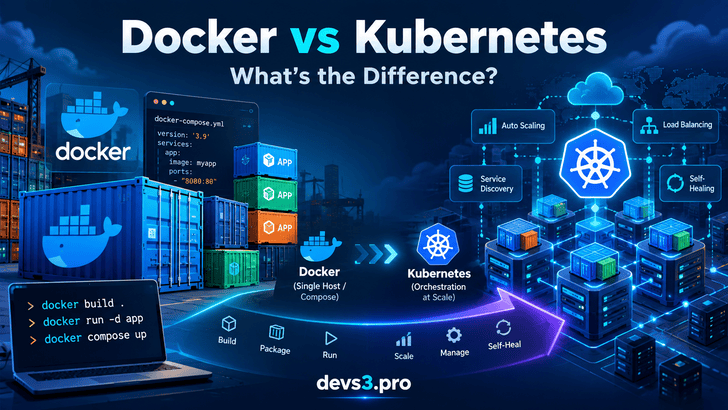
Think of Docker as the technology that helps you package and run your application in containers, while Kubernetes provides the orchestration layer needed to operate containerized workloads across infrastructure at scale.
Understanding this distinction can prevent teams from introducing unnecessary infrastructure complexity.
What Is Docker?
Docker is a containerization platform that allows developers to package applications together with their dependencies into portable container images.
Instead of worrying about differences between a developer's laptop, testing server, and production environment, teams can package the application into a standardized container.
Then the application stack can be started with a simple command:
text
docker compose up
For development environments, small production systems, internal tools, and applications running on one or a few hosts, this approach can be remarkably effective.
And importantly, it keeps infrastructure relatively simple.
Where Docker Starts Becoming Difficult
Imagine your application becomes successful.
Instead of three containers on one machine, you now have dozens of services running across many servers.
How do you distribute workloads across available machines?
How do services discover each other?
How do you perform deployments without downtime?
How do you automatically increase capacity when traffic spikes?
You could build scripts and automation around Docker to solve these problems.
But eventually, you are effectively building your own orchestration system.
That is where Kubernetes becomes useful.
What Is Kubernetes?
Kubernetes is a container orchestration platform designed to manage containerized workloads across clusters of machines.
Instead of manually deciding where every container should run, you describe the desired state of your application.
Kubernetes then continuously attempts to maintain that state.
For example, you might declare:
text
Application: payment-api
Replicas: 5
Minimum replicas: 3
Maximum replicas: 10
Health checks: enabled
Rolling updates: enabled
Kubernetes handles much of the operational work required to maintain those requirements.
Its capabilities include:
Container scheduling
Self-healing
Service discovery
Load balancing
Rolling deployments
Horizontal autoscaling
Configuration management
Secret management
Storage orchestration
Declarative infrastructure management
This is fundamentally different from simply running containers.
Docker vs Kubernetes: The Main Difference
A simplified comparison looks like this:
Area
Docker
Kubernetes
Primary purpose
Build and run containers
Orchestrate containerized workloads
Typical scope
Individual hosts
Clusters
Container image creation
Yes
No
Scheduling across nodes
Limited/not its main role
Yes
Self-healing
Limited
Yes
Autoscaling
Not its primary function
Yes
Service discovery
Basic/container networking
Built-in orchestration capabilities
Rolling deployments
Requires additional tooling
Built-in
Operational complexity
Lower
Higher
Best suited for
Development and simpler deployments
Distributed production systems
The technologies therefore shouldn't automatically be treated as competing alternatives.
A Kubernetes cluster still needs container images. Those images can be built with Docker or other OCI-compatible build tools.
The Bigger Shift: From Commands to Desired State
One of the most important concepts behind Kubernetes is declarative infrastructure.
With a simple container workflow, you might think:
text
Run this container.
Expose port 8080.
Restart it if necessary.
With Kubernetes, the mindset becomes:
text
I want five instances of this application.

They should always be healthy.

Traffic should be distributed between them.

Deploy new versions gradually.

Scale between 3 and 10 replicas depending on demand.
You describe the desired result.
Kubernetes continuously compares:
text
Desired State
      ↓
Kubernetes Control Plane
      ↓
Current State
      ↓
Reconciliation
      ↓
Desired State Restored
This reconciliation model is one of Kubernetes' most powerful architectural ideas.
How Kubernetes Maintains the Desired State
Several Kubernetes components work together behind the scenes.
API Server
The Kubernetes API server is the primary interface to the cluster.
Users, automation tools, controllers, and other components communicate with Kubernetes through its API.
Scheduler
The scheduler determines which nodes should run newly created Pods.
It considers factors such as resource requirements and scheduling constraints.
Controllers
Controllers continuously monitor resources and attempt to move the system toward the declared desired state.
If you request five replicas but only four are running, the appropriate controller works to create another.
Cluster State Storage
Kubernetes stores important cluster state and configuration information in etcd.
Kubelet
Each worker node runs a kubelet responsible for ensuring the workloads assigned to that node are running as expected.
Together, these components create a continuous control loop.
When Docker + Compose Is Enough
Not every application requires Kubernetes.
In fact, introducing Kubernetes too early can create more problems than it solves.
Docker and Docker Compose can be excellent choices when you have:
A small engineering team
A limited number of services
One or a few servers
Predictable traffic
Simple deployment requirements
Development or testing environments
Internal applications
Limited infrastructure management resources
Consider a small SaaS application consisting of:
text
Nginx
Frontend
Backend
PostgreSQL
Redis
If everything comfortably runs on one reliable server, deploying a Kubernetes cluster may provide little practical benefit.
You would be adding a distributed systems platform to solve a problem that may not yet exist.
When Kubernetes Starts Making Sense
Kubernetes becomes much more attractive when operational requirements become more sophisticated.
Typical indicators include:
Multiple Nodes
Your workloads must run across several machines.
Many Services
You operate numerous independently deployed services.
High Availability
Applications must survive container or node failures automatically.
Frequent Deployments
Teams deploy multiple times per day and require controlled rollout strategies.
Autoscaling
Capacity needs to automatically adjust as demand changes.
Service Discovery
Applications need a reliable mechanism for locating other services.
Platform Standardization
Multiple engineering teams require a common deployment and operational platform.
Declarative Operations
Infrastructure teams want application configuration stored in version control and managed through automation or GitOps workflows.
At this point, Kubernetes can replace a growing collection of custom deployment scripts and operational processes with a standardized orchestration model.
The Hidden Cost of Kubernetes
Kubernetes provides enormous capabilities, but those capabilities are not free.
The cost isn't simply cloud infrastructure.
There is also operational complexity.
Teams adopting Kubernetes need to understand concepts such as:
Developers can use Docker locally to build and test applications.
CI/CD pipelines build container images and push them to a registry.
Kubernetes then deploys those images across production infrastructure.
The technologies operate at different layers of the platform.
A Practical Decision Framework
Before adopting Kubernetes, ask your team several questions.
How many machines are we operating?
If everything comfortably runs on one host, Kubernetes may be unnecessary.
How many independently deployed services do we have?
A handful of services is dramatically easier to operate than hundreds.
Do we actually need automatic recovery?
If manual recovery is acceptable for your workload, sophisticated orchestration may provide limited value.
Do we need autoscaling?
Highly variable traffic can make orchestration more valuable.
How frequently do we deploy?
Frequent production releases benefit from standardized deployment strategies.
Can our team operate Kubernetes?
Infrastructure is only useful when your organization can maintain it reliably.
Final Thoughts
The Docker-versus-Kubernetes debate is based on a misleading assumption.
They aren't simply two competing solutions for the same problem.
Docker helps developers build, package, and run containerized applications.
Kubernetes helps teams orchestrate containerized workloads across infrastructure at scale.
For a small application, Docker and Docker Compose may provide everything you need.
As infrastructure grows across multiple nodes, services, teams, and deployments, Kubernetes can provide powerful capabilities such as scheduling, self-healing, service discovery, autoscaling, and declarative operations.
But Kubernetes should not be the default simply because it has become an industry standard.
The better question isn't:
“Should we use Docker or Kubernetes?”
The better question is:
“What operational problem are we trying to solve?”
Once that question is answered, choosing the appropriate technology becomes much easier.