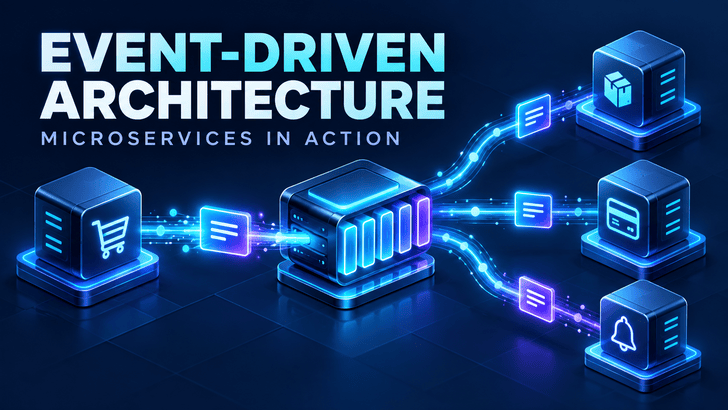
An order is placed. Inventory must be reserved, a payment must be processed, and the customer needs a confirmation. Should the order service call every other service and wait for each response? Event-driven architecture offers another way to coordinate that work.
In an event-driven system, a service publishes a message when something meaningful happens. Other services decide whether and how to respond. This approach can make a growing application easier to extend, but it also changes how teams handle failures, data consistency, and debugging.
What is an event?
An event is a record of something that has already happened. Examples include OrderPlaced, PaymentSucceeded, and UserRegistered.
The past tense matters. OrderPlaced states a fact; PlaceOrder asks a component to perform an action. Keeping that distinction clear helps teams design messages that accurately describe their purpose.
A typical event contains enough information for consumers to identify and process it:
An event usually travels from a producer through a broker or event router to one or more consumers. The producer publishes OrderPlaced; an inventory service, analytics service, and notification service may each react independently. This producer–router–consumer model is a common foundation for event-driven applications. aws.amazon.com
How is this different from direct API calls?
Consider an order service that calls three other services before returning a response:
text
Order Service → Inventory Service
              → Payment Service
              → Notification Service
The order service must know where those services are, what APIs they expose, and how to respond if one is slow or unavailable. Some of those dependencies may be necessary: a checkout page might need an immediate payment result before telling the customer that the purchase succeeded.
For work that can happen afterward, the order service can publish an event:
text
Order Service → OrderPlaced event
                     ├→ Inventory Service
                     ├→ Analytics Service
                     └→ Notification Service
The order service no longer needs to call every interested service directly. A new consumer can subscribe later without changing the order service. Consumers can also process events at different speeds, depending on the broker and delivery design. aws.amazon.com
Event-driven does not mean every interaction must be asynchronous. An application can use direct API calls when an immediate answer is required and events when other components need to react to a completed change.
A practical order-processing example
Suppose a customer submits an order. A workable flow might be:
The order service validates the request and creates an order with a PENDING status.
It publishes OrderPlaced.
The inventory service attempts to reserve the items and publishes either InventoryReserved or InventoryReservationFailed.
The payment service acts when the required conditions are met and publishes PaymentSucceeded or PaymentFailed.
The order status changes to CONFIRMED only after the required steps succeed.
A notification service sends a confirmation after the order is confirmed.
This example reveals an important design question: who owns the workflow? If a purchase requires several coordinated steps, a team must define which component tracks progress, handles failures, and decides when the order is complete. Publishing events alone does not solve that problem.
Why teams adopt event-driven architecture
Services can evolve independently
A producer publishes a defined event without knowing every consumer. Teams can add a recommendation or reporting service that responds to OrderPlaced without inserting another call into the checkout code.
Slow background work can leave the request path
Sending an email, updating a search index, or calculating analytics often does not need to delay the customer’s response. Moving that work to consumers can shorten the request path, provided the product can tolerate the delay.
Workloads can be absorbed and processed separately
A broker can hold events while consumers process them. During a traffic spike, teams may scale a busy consumer without scaling every service in the application.
These benefits come with operational costs. Event-driven systems can introduce message ordering concerns, greater infrastructure and monitoring needs, and harder end-to-end debugging. confluent.io
The challenges you must design for
1. A consumer may receive the same event more than once
Do not assume a message will be processed exactly once across an entire business workflow. A consumer should be idempotent: processing the same event again should not create a second charge, reservation, or email.
One approach is to store processed event_id values alongside the consumer’s work and ignore duplicates. The exact implementation depends on the side effect being protected.
2. Publishing an event can fail after saving data
Imagine the order service saves an order to its database, then crashes before publishing OrderPlaced. The order exists, but no consumer knows about it.
A transactional outbox addresses this gap by saving the business change and an outgoing event record in the same database transaction. A separate process then publishes the event from the outbox. The team still needs to handle duplicate publication at the consumer.
3. Data may be temporarily inconsistent
After an order is created, the analytics dashboard may take a moment to update. That delay is an example of eventual consistency. Product requirements should define which views can lag and which operations need an immediate, authoritative answer.
4. Event order can matter
OrderCancelled arriving before OrderPlaced can confuse a consumer that assumes chronological delivery. Where ordering is essential, define the scope in which it must hold, choose an appropriate partition key, and have consumers check state or sequence information.
5. Failed messages need a clear destination
A malformed event or persistent downstream error should not retry forever without visibility. Set a retry policy, record failures, and give operators a way to inspect and safely reprocess events.
6. Events become shared contracts
Changing an event field can affect several consumers. Use clear names, document payloads, version schemas when needed, and prefer compatible changes. An event should describe a meaningful business change rather than expose a service’s internal database structure.
When should you use it?
Event-driven architecture is useful when multiple parts of a system must respond to the same change, when background work can happen asynchronously, or when producers and consumers need to scale and deploy independently.
A direct request and response is often simpler when a user needs an immediate result, the workflow has few components, or the team does not yet have the monitoring and operational capacity to run messaging infrastructure. A small application can also publish events internally before introducing a broker and separate microservices.
The best starting point is a specific workflow, not a technology choice. Identify a real business event, one consumer that benefits from receiving it, the acceptable processing delay, and the expected failure behavior. Then add the infrastructure the workflow actually requires.
Final thoughts
Event-driven architecture lets services communicate through facts about what happened. Used well, it helps teams extend applications and move suitable work outside the immediate request path. Used carelessly, it can hide dependencies behind messages and make failures difficult to trace.
For a reliable design, define event contracts, make consumers safe to retry, protect the database-to-broker handoff, and decide who owns each business workflow. Those decisions matter more than the choice of broker.
Editor’s note: The linked LinkedIn post could not be retrieved, so this is an original article based on the event-driven architecture and microservices topic indicated by its URL, rather than a summary of that post.